Diese Seite wurde automatisch übersetzt. Es kann daher zu Abweichungen oder Ungenauigkeiten im Text kommen. Verbindlich ist ausschließlich die Originalfassung. Rechtsansprüche aus Inhalten der übersetzten Version sind ausgeschlossen.

Events in Kitzingen

Kitzingen Wine Festival


On 31 October, Kitzingen will bring the 2026 tourist season to a close – with a parade, music, Franconian traditions and wine in the market square.

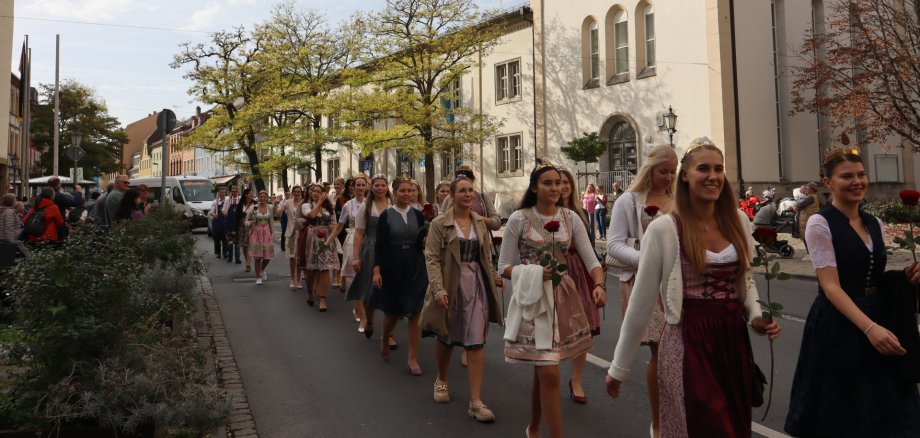
As the season draws to a close, Kitzingen comes alive once more: on Saturday 31 October, the Kitzingen Wine Festival invites locals and visitors alike to bring the tourist season to a close together.

The event kicks off at 12.45 pm at the Falterturm. From there, the procession – featuring representatives from the tourism sector, royalty, local clubs and tour guides – will make its way to the market square. There, visitors can look forward to music, welcoming speeches, a performance by the Franconian folk dance group and other Franconian highlights – including an appearance by the Franconian Wine Queen.

There’s plenty to discover around the town hall from the morning onwards: the tourist information centre will have an information stand there, along with a drawing table, childcare and other stalls and activities.

Come along and join us in celebrating the end of an eventful tourist season!

At a glance

  • When: Saturday 31 October 2026
  • Parade: 12.45 pm, meeting point at the Falterturm
  • Where: Falterturm, Town Hall and Market Square, Kitzingen

Help with accessibility

  • General

    We endeavour to make our website accessible. You can find details on this in our accessibility statement. You can send us suggestions for improvement via our feedback form Report accessibility.

  • Font size

    To adjust the font size, please use the following key combinations:

    Larger

    ⌘command
    +

    Smaller

    ⌘command
    –

    Larger

    Ctrl
    +

    Smaller

    Ctrl
    –
  • Keyboard navigation

    Use TAB and SHIFT + TAB to navigate through next/previous links, form elements, and buttons.

    Use ENTER to open links and interact with elements.

  • Contrast mode

    Press the following key combination to reduce or increase the contrast:

    Enlarge

    ⌃control
    ⌥option
    ⌘command
    .

    Decrease

    ⌃control
    ⌥option
    ⌘command
    ,
    Note: The shortcuts must be activated in the system settings of the operating system.

    Press the left ALT key + left SHIFT key + PRINT to quickly turn high contrast mode on or off.

  • Invert colours

    Press the following key combination to switch the colour inversion on and off:

    ⌃control
    ⌥option
    ⌘command
    8
    Note: The shortcuts must be activated in the system settings of the operating system.

    First activate the screen magnifier and then switch the colour inversion on and off with the following key combinations:

    1. screen magnifier

    +

    2. invert colours

    Ctrl
    Old
    I
  • Screen magnifier

    Press the following key combinations to use the screen magnifier:

    Switch on/off

    ⌥option
    ⌘command
    8

    Enlarge view

    ⌥option
    ⌘command
    =

    Zoom out view

    ⌥option
    ⌘command
    –
    Note: The shortcuts must be activated in the system settings of the operating system.

    Switch on / Enlarge view

    +

    Zoom out view

    –

Select language